IoT Device Connectivity
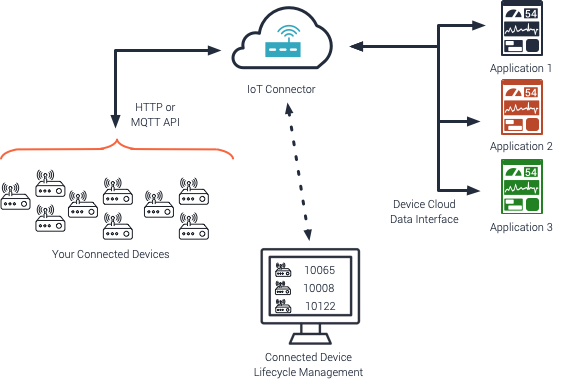
IoT Connector Overview
The Exosite Murano platform's IoT Connectors provide a scalable cloud gateway for interfacing with Internet of Things (IoT) Devices. Exosite's IoT Connectors provide the following functionality:
IoT Device Identity Management
Uniquely managed identities for authentication, data event tracking, claim of ownership, control, and in-field software updates
Device Authentication
Supports provisioning and authentication for Token, TLS Client certificates, and Passwords. For TLS Client Certificates, support for self-signed, CA verification, and PKI.
Device Protocol Device APIs
Exosite's secure device API protocols scale to support millions of connected unique devices and data events.
Use the device API protocols along with the ExoSense data scheme HTTP Device API, MQTT Device API, Cloud-to-Cloud
IoT Data
Data events generated by IoT Connectors can immediately be used with the ExoSense application directly, can be consumed by custom Murano platform applications, external platforms, and custom data event handlers can be put into place.
Building custom Murano platform applications, use with external platforms, and custom data event handlers are Advanced topics (Advanced Accounts).
Firmware and Content Storage
IoT Connector content storage is accessible for both upload and download of files. Typically used for infield software updates (OTA), high resolution data files, media upload, and log files
Off-the-Shelf Hardware
Many common industrial gateways, controllers, and sensors have already been interfaced to Exosite. Depending on the product, it either talks to Exosite's Device APIs directly, connects through its manufacturer's device cloud, or uses a custom protocol handler that Exosite built with the hardware partner as part of the IoT Connector.
To get started, buy the hardware, follow its guide to set up the IoT Connector, register your devices, and add the connector to ExoSense.
Gateways, Controllers, and Sensors
| Hardware | Type | Guide |
|---|---|---|
| HMS Ewon Flexy | Industrial remote access gateway (direct connect, bypasses Talk2M) | HMS Ewon Flexy Direct Connect |
| SICK TDC-X | Telematic data collector edge gateway | SICK TDC-X |
| Arduino Opta | PLC | Arduino Opta |
| Eurotech | Edge gateway | Eurotech |
| Moxa UC Series | Edge gateway | Moxa UC Series Setup |
| INS / Moxa | Pre-configured Moxa gateway for no-code Modbus monitoring | INS/Moxa |
| InHand Networks IG Series | Edge gateway | InHand Networks IoT Gateway |
| ICP DAS WISE | IIoT edge controller | ICP DAS WISE |
| Banner DXM | Industrial wireless controller (beta) | Banner DXM |
| TE Connectivity 8911 | Wireless accelerometer | TE 8911 Wireless Accelerometer |
| TE Connectivity IoT Mini Start Kit | Sensor starter kit | TE IoT Mini Start Kit |
| Radio Bridge | Wireless sensors | Radio Bridge |
| Particle | Wi-Fi and cellular embedded devices (through Particle webhooks) | Particle Devices |
| Twilio Electric Imp | Embedded connectivity modules | Electric Imp |
| Node-RED | Flow-based software running on many gateways | Node-RED |
Device Clouds and Networks
If your devices already report to another device cloud or network, connect that cloud to an IoT Connector instead of reconfiguring each device.
| Platform | Guide |
|---|---|
| Azure IoT Hub | Azure IoT Hub |
| AWS IoT Core | AWS IoT Core |
| The Things Network (LoRaWAN) | The Things Network |
| Sigfox | Sigfox |
| MachineQ (LoRaWAN, by request) | MachineQ |
| Digi Remote Manager | Digi Remote Manager |
| BACE | BACE |
| Sierra Wireless Octave | Sierra Wireless Octave |
Don't see your hardware?
Most gateways and controllers that can send MQTT or HTTPS can connect directly. See Interface Custom Hardware below, or contact Exosite support.
Interface Custom Hardware
If you build your own hardware products or industrial edge devices, connect them to Exosite in one of three ways.
| Approach | Best for | Start here |
|---|---|---|
| Direct connectivity | New or custom devices you control the firmware or software for. Best for scale, ease of use, and security. | Connect a Device |
| ExoEdge | Linux gateways reading Modbus or other local sources, configured instead of coded | ExoEdge Overview |
| Device cloud federation | Devices that already report to AWS, Azure IoT, or another device cloud | Integrating Device Clouds |
Direct Connectivity
Your device uses Exosite's MQTT or HTTP Device API to send data in the ExoSense data schema. Both are standard protocols, so most devices can be integrated quickly.
- Create an IoT Connector and add a device identity. See Connect a Device.
- Pick a protocol, MQTT or HTTP, and an authentication method. See Device API Encryption Requirements.
- Have the device publish its channel configuration (
config_io) and data (data_in) using the ExoSense data schema. - Add the IoT Connector to ExoSense and claim the device.
Helpful resources
- Libraries / SDKs for client code
- Device Provisioning Tutorial
- Raspberry Pi Tutorial as a working example
- Device Control and Device Infield Update (OTA) to send commands and software to devices
Device Cloud Federation
Devices that already talk to AWS, Azure IoT, or another device cloud service can be integrated into an IoT Connector through Exosite's federation API, without changing device firmware.